• Apps
  • Help Center
  • Blog
  • Contact Us

📖 Fundamentals

  • Clerk Invoices App: Time Import
    • How Importing Time Works
    • Time Rounding
    • Filter Time by Project
    • Filter Time by Employee
    • Filter Time by Team Scheme Role
    • Filter Time by Issue Field
    • Filter Time by Issue Type
    • Filter Time by Issue
    • Filter Time by Epic
    • Filter Time by Version
    • Filter Time by Component
    • Filter Time by Jira Filter and JQL
    • Filter Time by Service Management Organization
    • Filter Uninvoiced Time
    • Filter Time by Tempo Account
    • Filter Tempo Billable Time
    • Filter Time by Tempo Work Attribute
    • Importing Time with Issue Security Schemes
View All Articles
  1. Help Center
  2. Fundamentals
  3. Clerk Invoices App: Time Import

Filter Time by Epic

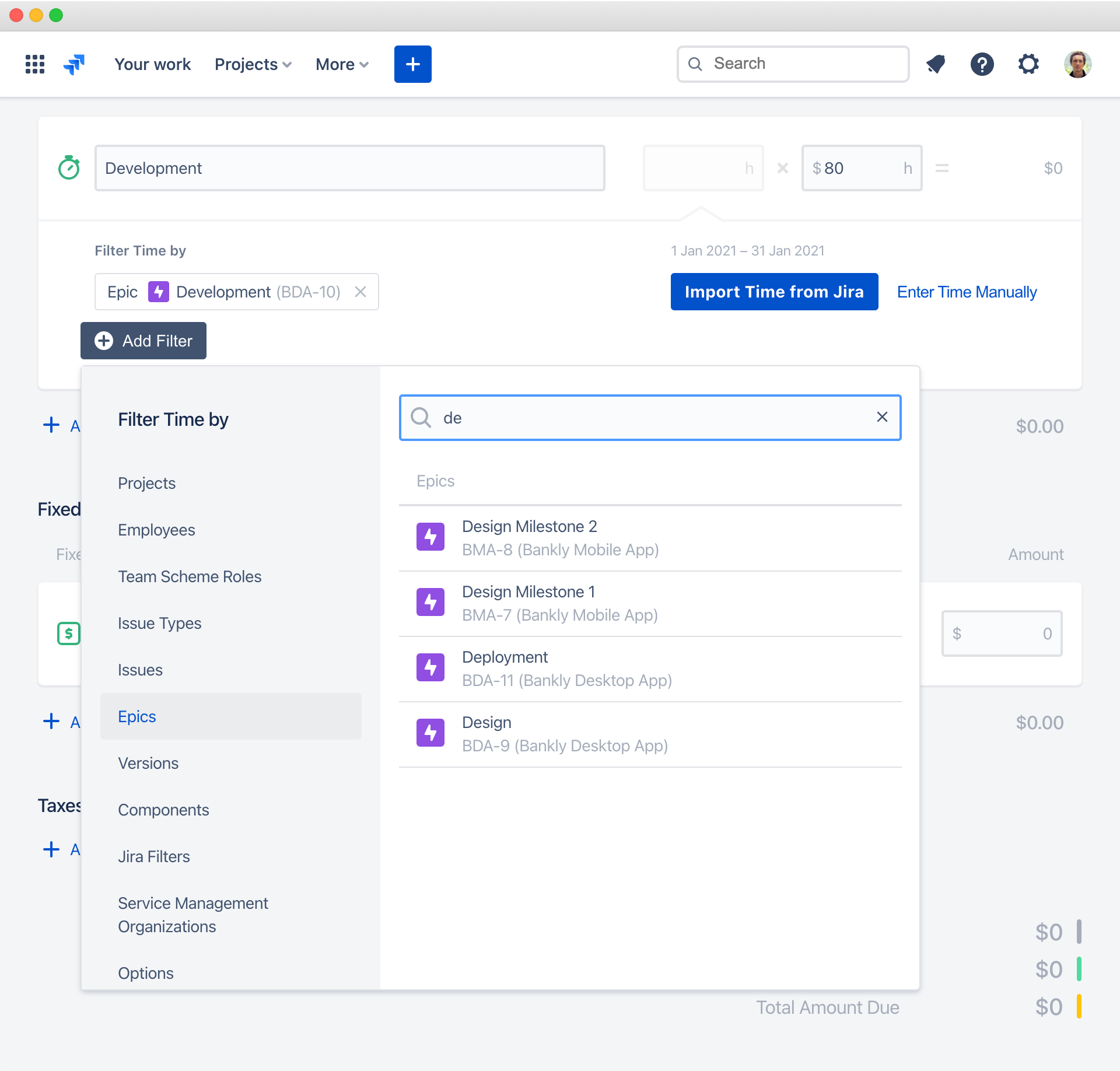
To filter invoice item time by specific Jira epic, in the invoice editor, click Add Filter ▸ Epics. You can filter imported time by multiple epics.

Logged time of all epiс issues and their sub-tasks will also be included.

To add the epic to the filter, use search on top. You can search for epics by name or key:

←
Filter Time by Issue
Filter Time by Version
→

Have question or miss feature? ✉️ Contact us. We are ❤️ happy to talk!

  • Company
  • Blog
  • Contact Us
  • Atlassian Vendor Profile
  • Apps
  • Clerk Invoices
  • Clerk Budgets
  • Clerk Quotes
  • Clerk Products
  • Support
  • Help Center
  • Contact Support
  • Live Chat
  • Legal
  • Privacy Policy
  • Security Policy
  • Terms of Services
  • Data Processing Agreement
  • Follow Us
  • Linked In
  • Twitter
  • Facebook
  • YouTube

Hello Clerk, Inc.
651 N Broad St, Suite 206, Middletown, DE 19709, USA

Cookies

We use cookies to analyze how visitors interact with our website. Analytics cookies only run if you accept them.

Functional Always active
The technical storage or access is strictly necessary for the legitimate purpose of enabling the use of a specific service explicitly requested by the subscriber or user, or for the sole purpose of carrying out the transmission of a communication over an electronic communications network.
Preferences
The technical storage or access is necessary for the legitimate purpose of storing preferences that are not requested by the subscriber or user.
Statistics
The technical storage or access that is used exclusively for statistical purposes. The technical storage or access that is used exclusively for anonymous statistical purposes. Without a subpoena, voluntary compliance on the part of your Internet Service Provider, or additional records from a third party, information stored or retrieved for this purpose alone cannot usually be used to identify you.
Marketing
The technical storage or access is required to create user profiles to send advertising, or to track the user on a website or across several websites for similar marketing purposes.

  • Manage options
  • Manage services
  • Manage {vendor_count} vendors
  • Read more about these purposes
View preferences
  • {title}
  • {title}
  • {title}