Quote Elements
In this article, you will see the elements that every quote has and how you can use them.
Here’s what a typical quote looks like:
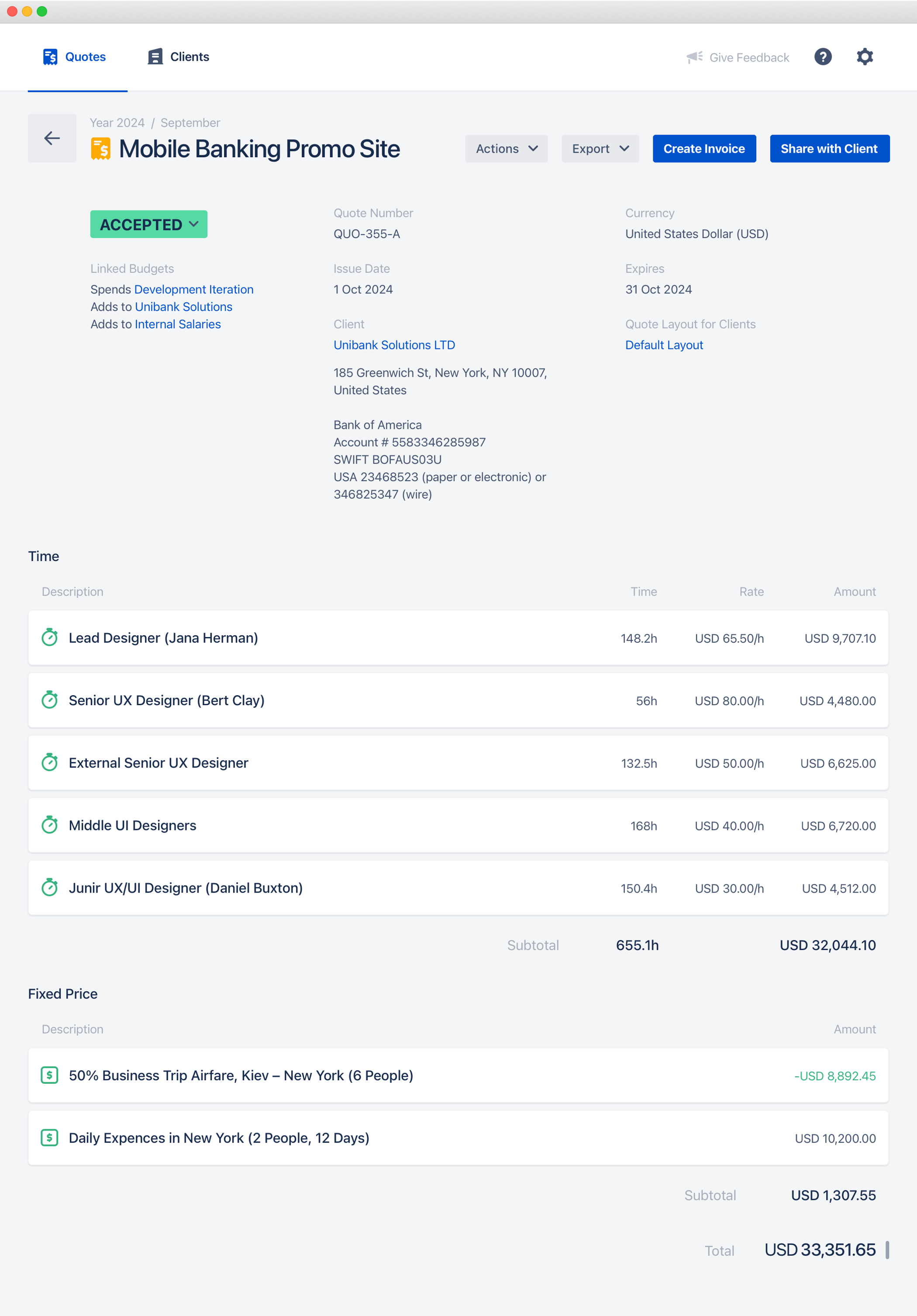
All elements are grouped into the following logical blocks:
- Basic quote fields
- Linked budgets
- Time items
- Fixed price items
- Taxes and discounts
- Totals
- Notes for client
Let’s look at them one by one.
Basic Quote Fields
These fields are pretty standard for any quote:
| Field | Description |
| Subject | The subject line is the quote title. It helps to identify the quote. |
| Status | The status of the quote. You can read more about the statuses in the Quote Statuses article. |
| Issue Date | The date when the quote was issued. |
| Expires | The date when the quote ceases to be relevant. |
| Quote Currency | The currency of all quote amounts. |
| Quote Number | The unique quote number. This number is used to identify the specific quote. You can set custom quote numbers, please read the Custom Quote Numbering article for more details. |
| Client | The quote client. |
| Quote Layout | The quote layout defines how this quote will look for the client. Please read the Customizing Quote Mockups article for more details. |
Linked Budgets
This block contains linked budgets from the Clerk Budgets app.
Time Items
The quote items with a time-based pricing model. Every time item has the following fields:
| Field | Description |
| Item Description | A description that explains what is quoted in the current item. It could be a work type, like “Back-End Development”. Or employees level, like “Senior Developers”. |
| Time | The quoted time. |
| Rate | The hourly rate that is applied to the current quote item. |
| Amount | The item amount that equals Time × Rate. |
| Discount and Taxes Options | The discount and taxes options show whether a discount or specific tax is applied to the current quote item. See the Applying Taxes and Discounts article for more details. |
Fixed Price Items
Every fixed price item has the following fields:
| Field | Description |
| Item Description | A description that explains what is quoted in the current item. |
| Amount | The quoted item amount. You can enter a negative amount if required. |
| Discount and Taxes Options | The discount and taxes options show whether a discount or specific tax is applied to the current quote item. See the Applying Taxes and Discounts article for more details. |
Taxes and Discounts
The taxes and discounts that are applied to the current quote. Read the Applying Taxes and Discounts article for more details.
| Field | Description |
| Tax or Discount Name | The name of the tax or discount is being applied to the quote. |
| Percentage | The tax or discount percentage that will be applied to the selected quote items. |
| Amount | The total amount of the quote discount or tax. |
Totals
| Field | Description |
| Total | The grand total quoted amount. |
Notes for Client
The notes that will be visible to the client. You can put here any comment or clarification for the client to add more transparency and clarity.